All Activity
- Past hour
-

Frustrated and in need of help
HayleyGilbert24 replied to HayleyGilbert24's topic in General ZT Discussion
Oh yes I did. 😉 -

Frustrated and in need of help
Savannahjan replied to HayleyGilbert24's topic in General ZT Discussion
I'm late to the topic, as usual. Hayley I answered your PM but hopefully you have this licked by now. - Today
-
It took me quite awhile before I got the hang of it
-
Frustrated and in need of help
HayleyGilbert24 replied to HayleyGilbert24's topic in General ZT Discussion
Thank you so much. I think I need to keep practicing and learn as I go. -
Here you go: objectpack_test.ztd
-
Frustrated and in need of help
HayleyGilbert24 replied to HayleyGilbert24's topic in General ZT Discussion
Ok so i removed the folder and tried it out and it's still not showing up :/. Do you have file that you fixed by any chance? Maybe there is something I did incorrectly again. -
Frustrated and in need of help
HayleyGilbert24 replied to HayleyGilbert24's topic in General ZT Discussion
I might've added that by accident. I think I was going too fast in adding files that I didn't pay attention. Thanks for catching that. ❤️ -
The first thing I noticed is that you have an extra objects folder under the scenery/other folder. In this case, with combining objects, the only files you should have under scenery/other should be the .ucs files. I did a test. I put your objectpack.ztd file in my game. And, as expected, nothing showed up. I made a copy of the file and removed the extra objects folder. Then your items showed up. I'm not quite sure how you managed to get that extra objects folder under scenery/other tho'
-
Frustrated and in need of help
HayleyGilbert24 replied to HayleyGilbert24's topic in General ZT Discussion
Here is one of my attempts that I tried last night objectpack.ztd -
Try a small one of say 6 or 7 first and post that. A huge file might be difficult to attach.
-
Looks like you are like me Hayley I so far have never mastered it But just do as Fern says she and Cricket will be able to guide you through it no doubt
-
If you used winrar did you save it as a .rar file as those do not work in ZT if you change .rar to .ztd. Post one of your attempts here and cricket or I will see what we can suss out.
-
Hi all. So recently I've been trying to combine ZTD files so I can save up more space for more ZTDs. However, I tried several different methods and they all fail. For example, I used WinRar, GIT, and even watched a tutorial online and it still didn't work. I also renamed the zip file to a ztd file according to the instructions and the items never show up in my purchase menus. I'm almost considering asking someone who is more technological than me to combine files for me if I send some to them. I don't know if I'm either doing it incorrectly or I'm just cursed. It is so frustrating. I really could use the help.
- Last week
-
Goosfer just a couple of thoughts. Most likely HayleyGilbert24 did not follow the steps exactly. For example, maybe they somehow got their "combined" folder name inside the ztd they created, or maybe they didn't rename ".zip" to ".ztd".
-
Thank you!
-
Weird! Busy with grad school weekdays but I'll play with it this weekend and see if I spot the problem.
-
Thanks
-
Do you mean Endangered Animals by Borsato?: https://www.zooberry.org/mods/zt1/animals/animal-bundles/endangered-animals/
-
Good afternoon everyone, I looking for a file Endangered Species Pack. I think i might of deleted it when cleaning up my PC, Any help would be big help. Thanks
-
All of them
-
Thanks, but when you say you see missing icons ingame is it on all of them? If not, which ones? I just want to narrow down where we’re hitting the bug.
-
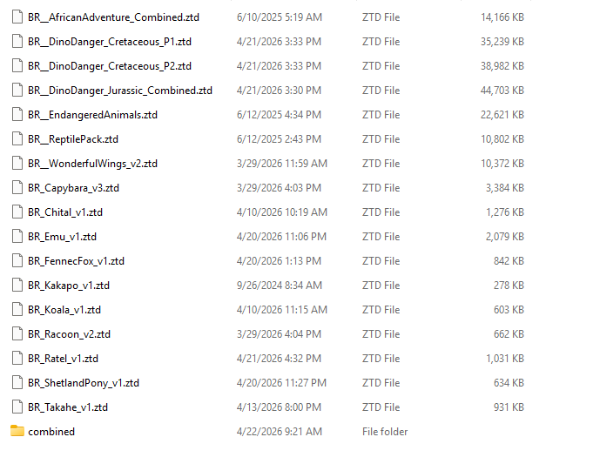
So its these animal packs and individual ztds right here
-
For all of them or just some of them? Can you tell us which animals?
-
So I managed to combine them but the problem is the icons for the animals are not showing up
-
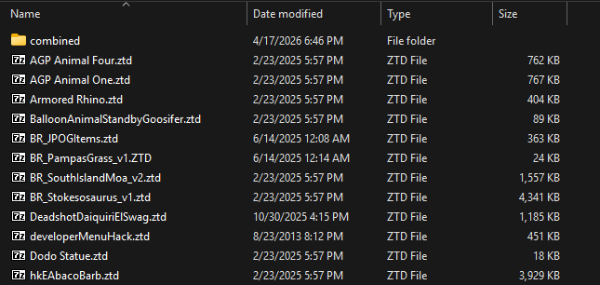
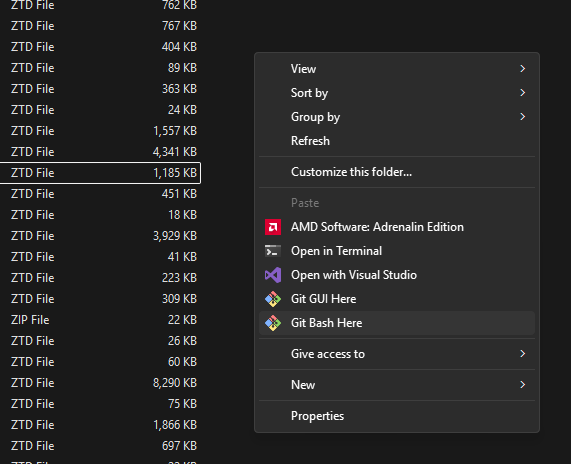
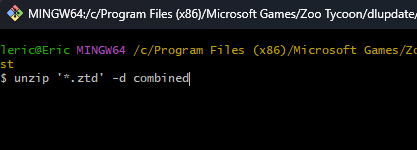
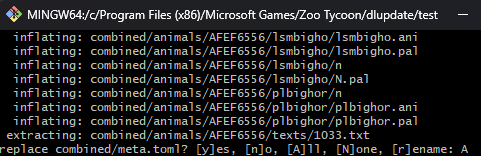
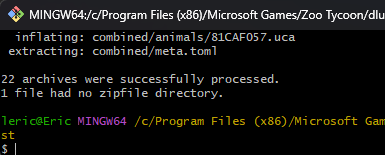
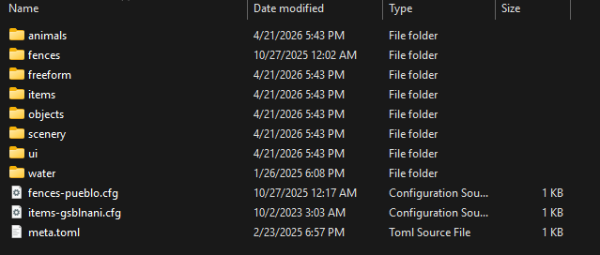
By chance did you ask a similar question on Discord recently? If so, sorry for the duplicate advice lol. Making your own combined packs is super easy. Here's a tutorial for batch combining ztd files on Windows. It's a bit technical, but it's convenient and fast once you get the hang of it. What You'll Need Git for Windows: https://git-scm.com/install/windows Install; you might need to restart your computer. Step 1 Create a new folder, call it whatever you want. Anywhere is fine, we just need a workspace. Copy or move all of the ztd files you want to merge into this folder. Step 2 Create another folder inside of your workspace. Call it whatever you want. I called mine 'combined'. Here is what your workspace should kind of look like: Step 3 Right click on an empty area of your workspace to bring up the mouse menu. Look for 'Git Bash Here'. You might need to click on Show More Options first if you're on Windows 11. Step 4 We're almost there. At this point a black console window titled MINGW64 should have come up. Click on it so you can type the following command. Note that if you named your 'combined' folder something different, simply replace the word 'combined' in the command: unzip '*.ztd' -d combined and hit <ENTER> on your keyboard. This will look for all files with the ZTD extension (aka ZT1 mods) within your workspace and combine them inside of the 'combined' folder. Below are screenshots of what should happen: Step 5 Now go into your 'combined' folder. You'll see all of files unzipped in the same spot, which is what we want: From here, use your favorite method to zip them up into a ztd file (super easy). If you're on Windows 10 or 11, you can select all of these files, right click, and Compress to... ZIP File. You'll have a new zip file in that directory, likely named after the first folder in your active directory (mine was animals.zip). You'll want to rename it to something different and change the extension to .ztd: Step 6 Move your new pack into the dlupdate folder! Troubleshooting Keep a lookout for a question mid-merge that will ask what to do with duplicate files. You shouldn't encounter this with Hawkkeye's files, but you might with others especially if you download from ZooBerry. It's okay to type 'A' for [A]ll to this question. Usually it's just about a meta.toml file that contains author information not required for the mod to work.