
Leaderboard



Popular Content
Showing content with the highest reputation on 10/06/2026 in Posts
-
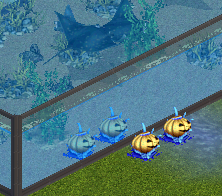
Since I was doing tankable stuff I decided to have a little fun. Seems the marine life mostly miss out on Halloween so I made a tankable pumpkin. http://www.ztcdd.org/DG/index.php?topic=5204.0
 1 point
-
For those that do not like hacks I have released Eleven Dino Digs pieces of scenery made tankable, exhibit, and water placeable. Large Geyser, Small Geyser, Lava Pit, Tar Pit, Large Volcano, Small Volcano, Steam Vent, Bone Bed, Small Fossil Wall, Medium Fossil Wall, Large Fossil Wall. Note: I used a light blue menu icon for these. DD Objects As Exhibit Placeable1 point
-
So I talked about this idea with Vondell a long time ago, but today finally sat down to code it... Introducing the AUTOMATIC BLENDER SPRITE RENDERER Say you have a model in blender, and some animations for it. This tool will go over each animation and render all five required views for ZT1. It also sets up the camera, lighting and shadow - you don't have to worry about a thing! Obviously, this tool also allows you to import existing models and animations, for example from ZT2 with the scripts I made. Below is some of the output with models from my ZT2 WWD project: (incase the left version is a still image for you, change your browser for something with APNG support!) The current assumption is that 1 meter ingame equals 16 pixels. You can scale to the blender grid before rendering and should then get corresponding results ingame. Note that I forgot to scale them in blender, which is why Koola looks ridiculously huge :P Gosh - it's been more than a decade since I designed for ZT1! It doesn't support soft transparencies, does it? Is the size of the images relevant? Is there a software solution to crop and anchor each frame as in the official files? Does zoot have a commandline interface? If so, I could make the program export finished ZT1 anims instead of individual PNG sets. Release should follow soon, I have to add some button to the user interface...1 point