Leaderboard


Popular Content
Showing content with the highest reputation on 09/16/2026 in all areas
-
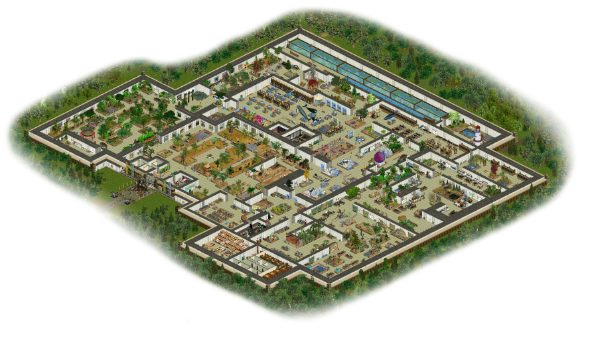
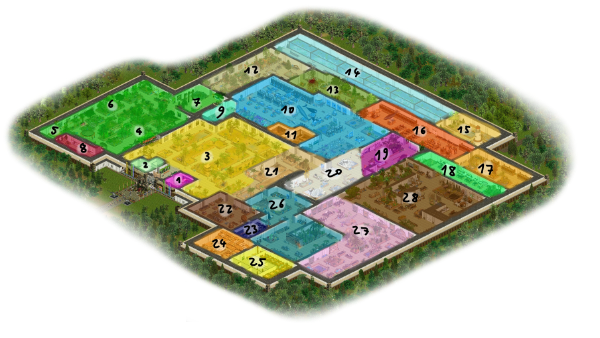
And here is the full map: 1 - Gift Shop 2 - Restrooms 3 - African Savannah Hall 4 - Rainforest Hall: Africa 5 - Rainforest Hall: Australia 6 - Rainforest Hall: Asia 7 - Rainforest Hall: South America 8 - Special Exhibit: Big Cats 9 - Galápagos Hall 10 - Our Oceans 11 - Museum Café 12 - North America Hall 13 - Europe Hall 14 - Fishes of Europe 15 - The Wadden Sea 16 - Mammal Hall 17 - Ornithology Hall 18 - Extinction Hall 19 - Our Climate 20 - Polar Hall 21 - Desert Hall 22 - Mineralogy Hall 23 - Space Hall 24 - Fossil Collection and Preparation Laboratory 25 - Zoological Collection 26 - The Palaeozoic 27 - The Mesozoic 28 - The Cenozoic
 1 point
-
There are some white bison (buffalo) around by both genki and JohnT. And JohnT also did a black one.1 point
-
Thank Jay for getting back to me. I also finally figured that out myself and got it fixed. I have no interest nor time to configure these as separate animals, but, as always, anyone interested is welcome to do so. The dimorphism was Heather's idea to help bring more palette options available into the game. However, it does require configuring the .ai file. While it is now technically possible to combine attribute files during play using OpenZT, that is not a realistic expectation for the majority of players. Conflicting attribute file is the biggest complaint around hacks in ZT, so I will be offering non-dimorphic versions that should not interfere with any existing hacks. Here are the versions that I will release, with the standard bison as comparison. Note that all versions only differ in the adults. The calf palette edit is the same across versions. First version is dark, reddish-brown. I refer to this variant as "choccy" for short. Second version is quite a bit lighter and warmer with a note of orange. I refer to this version as "tangy". Coming up after the bison.1 point
-
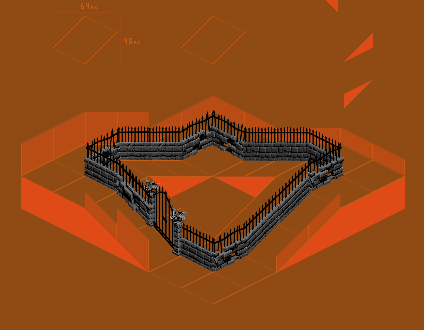
Updated the fence graphics (again) for better brick detail as well as some damaged fences.
 1 point
-
From Jay: Since Jm_OstrichDimorph_Hack.ztd has f.pal and y.pal, most likely ZT Studio was used. It is also possible to use a hex/binary editor, which is how it was done before ZT Studio existed, but it is a lot of work. It involves renaming the new f pal file to have the same number of letters as ZT's pal file, copying the m animations to a f folder, changing all ani files in the f folder to use f instead of m, using a hex/binary editor to change all animations in the f folder to use the new pal file, and having the uca file use "f = animals/.../f" instead of "f = animals/.../m". As for having a volcano use ZT's animations but with different characteristics, using a new internal name isn't much more than a hack. That would be renaming volcano.ai to volcavnd.ucb, changing "idle = idle" to "idle = objects/volcano/idle/idle.ani", changing "used = used" to "used = objects/volcano/used/used.ani", and changing the cPurchaseCost setting to make it obvious which is which in the purchase menu. From me: I can do all the underwater stuff easily without making it a hack same as I did all the foliage so it is not dead on land. I have been thinking of recolouring some of the vents anyway.1 point
-
We got permission from her family after she died in a car accident. Her files were updated and we also created some memorial files for her as well.1 point
-
That sounds way less complicated but way more tedious than I expected. I might do that when I feel like. I also realized just now I forgot to take proper screenshots of the polar area, so I'll do that next time I start the game.1 point
-
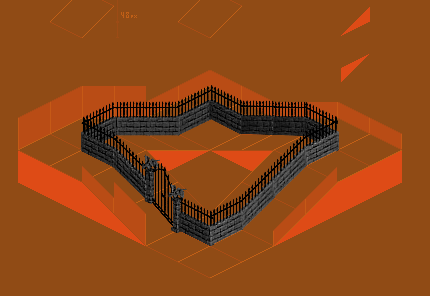
all angles rendered. fixed up the textures, removed metallic material from pikes (too shiny), and made brick a bit darker. shoutout to vondell for teaching me how to get the proportions right in blender so that they all fit.
 1 point