Leaderboard




Popular Content
Showing content with the highest reputation on 01/30/2021 in all areas
-
Thank god for Savannahjan and Timothy, wonderful job2 points
-
Welcome back! Hope you kept Timothy's number in case of emergency. Jan thank you for all the work you did. ?2 points
-
I am so happy you're back...when I tried to log on and got that 404 notice, I was scared! lol2 points
-
Version 1.0.0
1,370 downloads
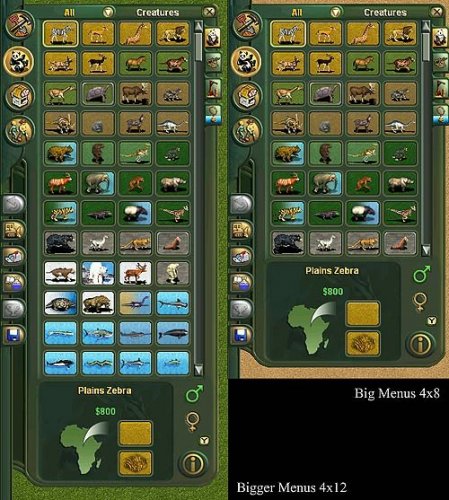
This mod changes the User Interface, making the Build Menu, the Animal Menu, and the Scenery Menu bigger. If you would like to see more icons in your menus then this is for you. This is meant for 1600x900 or higher widescreen resolutions, but will work on any resolution. There are 2 versions in the zip file, one that is for 800x600 screens, and the bigger one for all the rest. Only install one version. This mod integrates with Jay's allow purchase babies mod, thanks to Jay for suggesting this. This mod is technically a hack, because it modifies the following game files: buldhab.lyt, buya.lyt, buyobj.lyt, and teraform.lyt. It will not work with other mods that modify the same files. If you have an older version of this mod or you are using jay's allow purchase babies mod then you should uninstall those mods first before using this one! If you have any problems, or find any bugs or issues, leave a message here or msg me directly, thanks!1 point -
Version 1.0.1
822 downloads
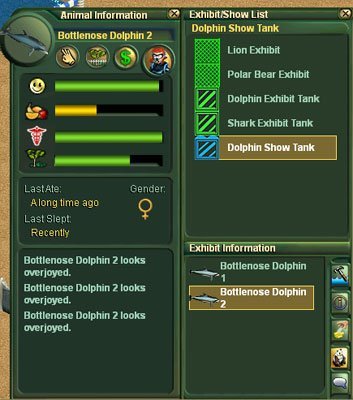
This mod is a user interface enhancement, which makes the info panels for animals, guests, staff, and buildings bigger. If you would like to see more information all at once in your panels then this is for you. This is meant for 1366x768 or higher widescreen resolutions, but will work on any resolution. This mod is technically a hack, because it modifies game files. It will not work with other mods that modify these same files. (color.lyt, drt.lyt, filter.lyt, infoanm.lyt, infoanm1.lyt, infoanm2.lyt, infoanm3.lyt, infocom.lyt, infocom1.lyt, infocom2.lyt, infocomC.lyt, infogst.lyt, infogst1.lyt, infogst2.lyt, infogst3.lyt, infoncm.lyt, infoncm1.lyt, infoncm2.lyt, infostf.lyt, infostf1.lyt, infostf2.lyt, infostf3.lyt, mulanim.lyt, mulguest.lyt, mulhab.lyt, mulhab1.lyt, mulhab2.lyt, mulhab3.lyt, mulhab4.lyt, mulstaff.lyt, tankmod.lyt ) If you have any problems, or find any bugs or issues, leave a message here or msg me directly, thanks!1 point -
Version 1.0.0
316 downloads
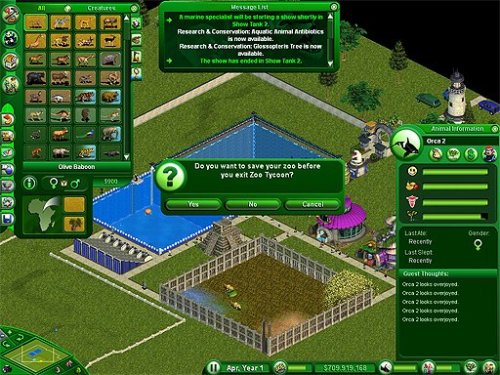
This is a total User Interface replacement mod for Zoo Tycoon 1 Complete Collection. This mod was designed for widescreens but will work in any screen resolution. This mod is technically a hack, because it modifies game files. It will not work with other mods that modify these same files. The files that it modifies are pretty much every UI template in the game. Fortunately, very few mods have ever used these files. As of right now, there are only 3 other mods that are known to modify any of these files, and those mods are Jay's Purchase Babies Hack, Jay's Developer Menu Hack, and Jay's Developer Map Editor. So I made my UI mod compatible with all 3 of those hacks. In the case of Jay's Purchase Babies Hack, I have integrated it fully into this mod. But with Jay's Developer Menu Hack, and Jay's Developer Map Editor Hack you still need to download his mods or they won't work. One other note: This UI mod will not affect your zoos, or your old saved games, so you can uninstall it at anytime, and it will not cause any issues. Instructions: (Remember to uninstall any other particleUI mods first! This mod replaces all my other UI mods!) To install this mod by itself: Just put the file named particleUI_DreamEmerald_v1.ztd into your "dlupdate" folder. If you wish to use Jay's Hacks: Just put the file named particleUI_DreamEmerald_x1.ztd into the same folder. If you are using Jay's Developer Menu Hack (developerMenuHack.ztd) or Jay's Developer Map Editor (developerMapEditorHack.ztd) then you should put particleUI_DreamEmerald_v1.ztd and particleUI_DreamEmerald_x1.ztd in the SAME FOLDER as Jay's Hacks, or you might have issues with those mods not displaying properly, or my mods not displaying properly. In most cases, that folder will still be "dlupdate", but it is possible that you have installed those files into a folder called "hacks" because that is how Jay has told people to install them. The files should be in this order alphabetically: developerMapEditorHack.ztd developerMenuHack.ztd particleUI_DREAM_EMERALD_v1.ztd particleUI_DREAM_EMERALD_x1.ztd If you have any problems, or find any bugs or issues, leave a message here or msg me directly, thanks! You can also see what I'm up to by checking out my project thread here https://zootekphoenix.com/forums/topic/14997-particles-projects/ I'd like to say thanks to JBL for making ztstudio, and also to Jay for allowing me to integrate his mods, and also to Cricket for being awesome! There is a purple version of this mod called Lost Amethyst, you can find it here: https://zootekphoenix.com/forums/files/file/5358-ui-hack-lost-amethyst-ui/1 point -
Wow, what an ordeal! It took a week of chats, e-mails and phone calls, but I finally found one person who actually knew what they were doing. It took Timothy about 30 seconds to fix our site. Thank you, Timothy! We have upgraded to the most recent board version, so it may seem a bit bright in here for now. We will be working on some new skins in the meantime. Please report anything that you find is not working properly. Cricket reported she could not see some areas of the site using Microsoft Edge. I tried Edge and it seemed to be working, so it could be the version or the software or some other browser issue. Let us know if you have any problems It was touch and go there, and we were facing the possibility that we would have to start over, losing our 14 years of content. That was just unthinkable, so I'm glad I became the worst pest customer service has ever had to deal with. Welcome home!1 point
-
HOW AWESOME IS THAT! WOOT! :D1 point
-
I am so glad Timothy came along and was able to help restore us! Very thankful for this! Jan, thank you so very much for all your work and prodding with the tech support folks!! Jan and I will be spending some time tweaking skins and a few other areas so please hang in there with us! Welcome back!!1 point